CloudGPU gave us the credit to run these tests on its GPUs. See the sponsorship note at the end.
In September we measured three speed tricks for MiniMax H3 in ComfyUI on our RTX 3090: Sage Attention, Kijai’s Sol-Attn and the two-pass latent upscale. The obvious next question was how those numbers change on an RTX 4090 and an RTX 5090. We rented both on CloudGPU, ran the same script with the same prompt and seed, and repeated each configuration three times. To keep the comparison clean, we also re-measured our own 3090 with the same software as the rented cards. Here are the timings exactly as they came out, plus two things we did not expect.
At a glance
| Aspect | Details |
|---|---|
| Model | MiniMax H3 INT8 ConvRot + 4-step turbo LoRA (Comfy-Org / lightx2v) |
| GPUs | RTX 5090 32 GB and RTX 4090 24 GB rented on CloudGPU, plus our own RTX 3090 24 GB |
| Clip | 736x416, 294 frames (12.25 s at 24 fps), seed 777 |
| Runs | 3 per configuration, interleaved; we report the median |
| Fastest | Sage + Sol-Attn: 26.1 s on the 5090, 38.0 s on the 4090 and 70.5 s on the 3090 (−37 %, −36 % and −40 %) |
| Surprise 1 | Sol-Attn changes the composition for the same seed |
| Surprise 2 | The no-tile upscale duplicated the fox in 2 of 12 clips (4 seeds × 3 cards) |
| Total test cost | 0.88 $ of GPU rental (the 3090 is ours) |
Method: the same script as on the 3090
We reused the script from the September 3 test unchanged. It builds the ComfyUI graph and submits it through the API. The prompt is the same fox running through a snowy forest:
Tracking shot of a red fox sprinting through a snowy pine forest at dawn, powder snow
kicking up behind its paws, low morning mist between the trees, warm sun rays cutting
through fog, frost on branches, photorealistic wildlife cinematography, shallow depth
of field, natural sound of snow crunching and wind through pines.
Resolution 736x416, 294 frames, euler sampler, simple scheduler, 4 steps, turbo LoRA at strength 1 and seed 777. The three configurations are:
- T1: PyTorch default attention.
- T2: + Sage Attention (
PathchSageAttentionKJ,automode). - T3: + Sage Attention on blocks 0-2 and Sol-Attn on the rest (
tau=1.3,int8_qkandint8_pvon).
On each GPU we first did a warm-up run with T3, which loads the model and compiles Sol-Attn’s Triton kernel. It does not count towards the table. Then we ran T1, T2 and T3 interleaved, three times each. Timing is server execution time taken from ComfyUI’s history. Loaders and the text encoder come from cache just like on the 3090, and we checked on each of the 9 runs per GPU that the sampler really executed and was not served from cache.
Software on both rented machines: ComfyUI 0.36.0, torch 2.10.0+cu130, Triton 3.6.0, sageattention 1.0.6 (the same version as on the 3090), ComfyUI-SolAttn_triton dfc2e31 and ComfyUI-KJNodes 3f20054. Driver 610.57.
On the 3090 we set up a separate ComfyUI install with exactly those versions and the same node commits, because our September install was newer (ComfyUI 0.34.2, torch 2.12.1, Triton 3.7.1). That way all three cards run the same software.
Results: Sage Attention and Sol-Attn
Median of 3 runs, in server seconds (fastest and slowest run in brackets):
| Configuration | RTX 5090 32 GB | RTX 4090 24 GB | RTX 3090 24 GB* |
|---|---|---|---|
| T1 default attention | 41.3 s (40.7-41.3) | 59.1 s (58.8-59.1) | 118.4 s (117.7-239.4) |
| T2 + Sage Attention | 33.3 s (32.6-33.7), −19 % | 46.9 s (46.9-47.0), −21 % | 88.8 s (87.8-97.2), −25 % |
| T3 + Sage + Sol-Attn | 26.1 s (25.9-26.5), −37 % | 38.0 s (38.0-38.0), −36 % | 70.5 s (68.4-76.0), −40 % |
* The 3090 is our own, running the same software as the rented cards. On September 3, with the older software and a single run, it gave 129.1 / 94.4 / 78.0 s.
👉 What matters: each trick’s relative gain holds across three GPU generations. Sage Attention removes between a fifth and a quarter of the time, and adding Sol-Attn brings the render down to a bit under two thirds. On the 5090, a 12.25 s clip renders in 26 seconds; on the 3090, in 70.
Run-to-run variation was tiny on the rented cards: at most 1.1 s on the 5090 and 0.3 s on the 4090. On the 3090 the first run of each configuration was slower (T1’s, at 239 s, is an extreme case), but the other two landed within 2 s of each other, which is why we report the median. With three runs per configuration, the differences in the table are not noise.
RTX 5090 with Sage Attention + Sol-Attn: 26.5 s to render 12.25 s of video in this run.
Surprise 1: Sol-Attn does not give the same video
On the 3090 we only compared one frame, and Sol-Attn looked practically the same as Sage. This time we checked 9 frames spread across each clip, and the conclusion changes. T1 and T2 are nearly identical, but T3 is a different shot: the fox is closer, the camera lower and the trees are different. It happens on both the 4090 and the 5090.

Frame 150 on the RTX 5090, same seed: T1 (base), T2 (Sage) and T3 (Sage + Sol-Attn).
T3’s quality is still good: we saw no deformations, duplicates or artifacts in any of the frames we checked. But Sol-Attn approximates part of the attention, and in a video model that is enough for the same seed to go somewhere else. If you are iterating on a seed you like, do not switch Sol-Attn on halfway through: choose your attention setup first.
One more detail: with the same seed, the 4090 and the 5090 give broadly the same scene, but not pixel-identical. Within each card, repeated runs do come out the same.
Surprise 2: the no-tile upscale duplicates too
In the 3090 test we found that the two-pass latent upscale could duplicate the fox when the frame was split into tiles. The only configuration that came out clean was no split at all: a single 1344x768 tile. We repeated exactly that configuration (736x416 base → 1344x768, fade of 128, seeds 777/778) on both rented GPUs and on our 3090 with the new software:
| GPU | Total time (2 passes) | Result |
|---|---|---|
| RTX 5090 | 218.5 s | Second fox between frames 140 and 152 |
| RTX 4090 | 325.3 s | A single fox throughout the clip |
| RTX 3090 | not comparable* | A single fox: it leaves the frame and comes back |
* On our 3090 each upscale took about 25 minutes, versus 325 s on the 4090. The most likely cause is the PC’s RAM: it has 32 GB, about 2 GB were free during the upscale, and the rented machines had 64 GB. That time is no good for comparing cards. For checking whether the fox gets duplicated, it is.
To find out whether it was bad luck, we reran the upscale on all three cards with three more seeds, checking the whole clip every 4 frames:
| Seed | RTX 5090 | RTX 4090 | RTX 3090 |
|---|---|---|---|
| 777 (the one above) | Second fox (218.5 s) | Clean (325.3 s) | Clean |
| 101 | Clean (220.2 s) | Clean (325.7 s) | Second fox from frame 244 |
| 202 | Clean (227.6 s) | Clean (340.7 s) | Clean |
| 303 | Clean (229.1 s) | Clean (342.2 s) | Clean |
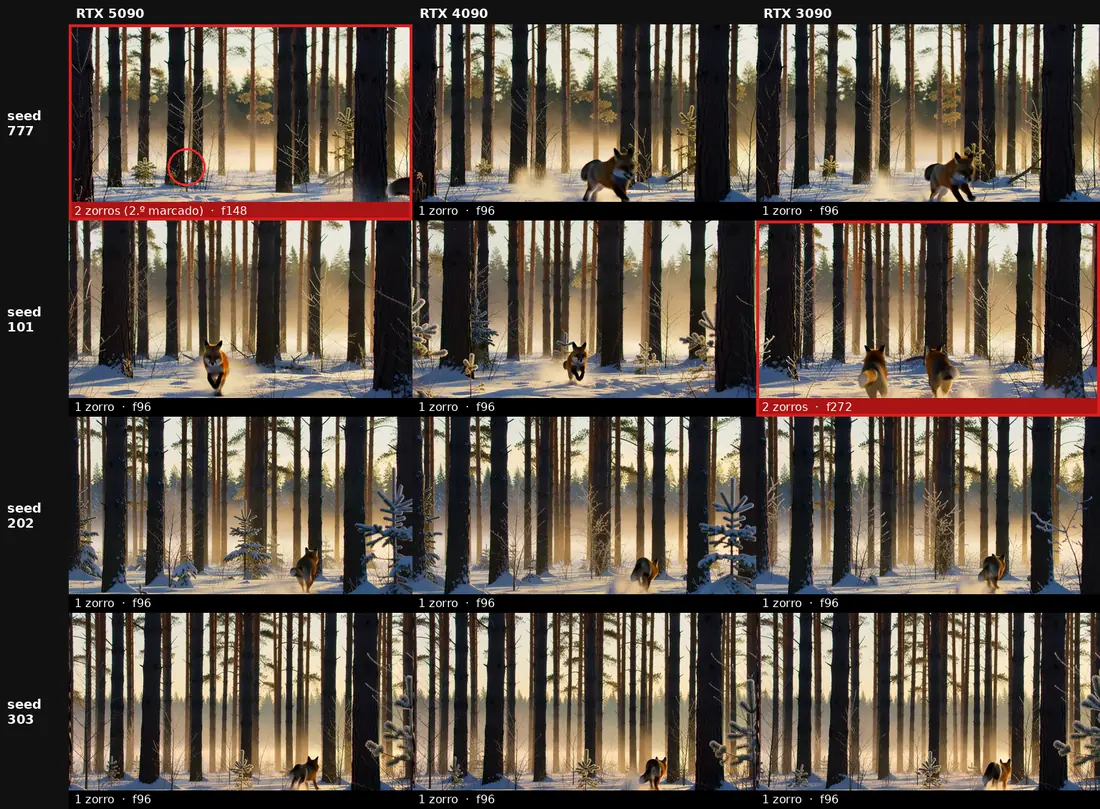
One frame from each of the 12 clips. The two that duplicate the fox are outlined in red.
It duplicates in 2 of the 12 clips, and never in the same combination: the 5090 fails with seed 777 and the 3090 with 101, while the 4090 comes out clean with all four. Not systematic, but not rare either: with 2 of 12 clips ruined, checking the clip is mandatory.
On the 5090, while the original fox exits right in the foreground, another one appears behind a trunk in the middle of the frame. For half a second both are visible at once, and the second one keeps crossing the background until the end of the clip. It is small and almost invisible in a thumbnail, so we checked it frame by frame at full resolution.
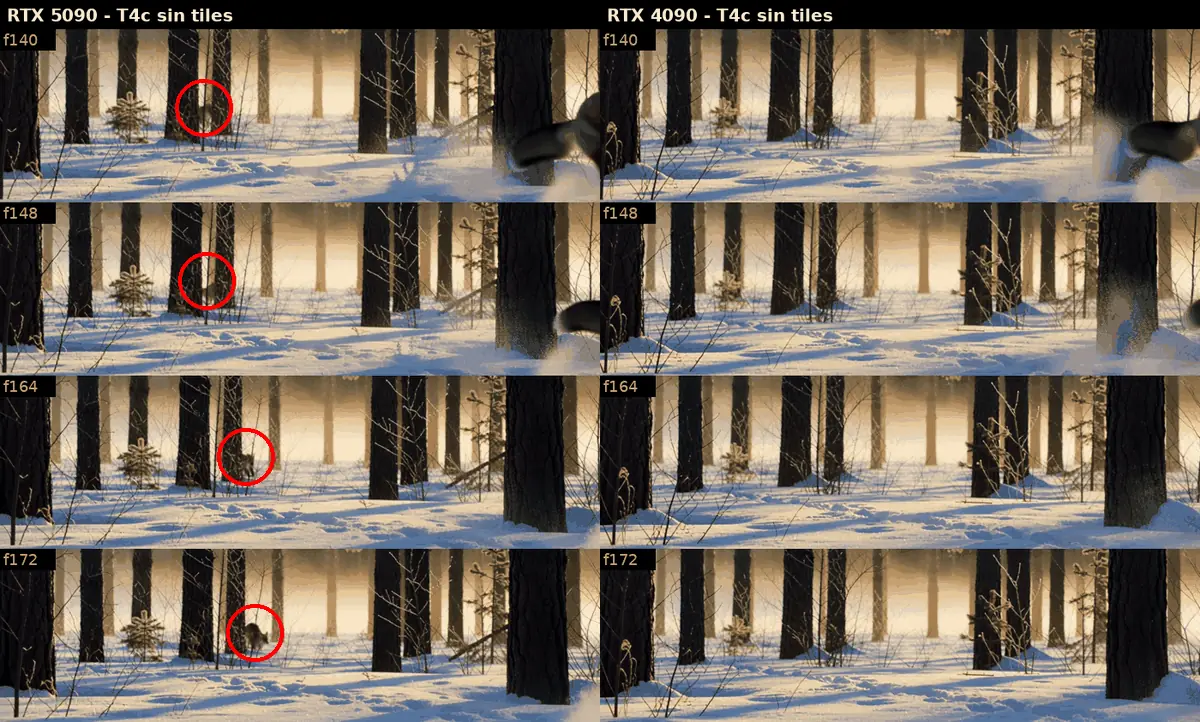
No-tile upscale, frames 140 to 172: RTX 5090 on the left (second fox circled) and RTX 4090 on the right.
The full RTX 5090 clip after the upscale. The second fox appears around second 6.
What we know and what we don’t:
- It does not seem to be a defect of one particular card. For the same seed, each card gives the same scene but with visible pixel-level differences (we saw it in T1-T3 too), and that may be enough for the upscale to fall into the duplicate or not. The 5090 and the 3090 each fail with a different seed and come out clean with the other three, so the failure most likely goes with the seed-and-card combination. That the 4090 came out clean with all four may be luck, given so few samples.
- The base pass was clean in every clip: a single fox that the camera follows the whole time. The duplicate is introduced by the second pass, which resamples at denoise 1.0 and changes the action, not just the resolution. In all 12 clips the upscale’s action differs from the base pass: the fox leaves the frame, hides behind a trunk or turns around.
- It may be related to the chunk change. The node processes the clip in 136-frame chunks with a 17-frame overlap (overlaps at 119-135 and 238-254). On the 5090 the second fox appears around frame 140, just after the first overlap, and on the 3090 around 244, inside the second one. It is not the same position, but in both cases it is close to a chunk change. With two cases we cannot confirm it.
- The 4090 is not perfect either: with seed 777 the fox leaves the frame around frame 152 and comes back around 245, and the 3090 does the same. There are never two at once, but the action no longer matches the base pass.
👉 The corrected rule of thumb: removing tiles reduces duplication, but does not eliminate it. In September we checked 9 frames on the 3090 and it looked clean, but the failure can last half a second and is easy to miss. If the upscale is for something you will publish, review the whole clip at full resolution.
One number to read carefully: we could not find the step count we used for the second pass on September 3, so here we used 4 base steps and 4 upscale steps.
Real cost per clip
CloudGPU prices on 2026-10-27: RTX 5090 at 0.59 $/h and RTX 4090 at 0.33 $/h, billed per minute. GPU time only:
| RTX 5090 | RTX 4090 | |
|---|---|---|
| Clip with Sage + Sol-Attn (T3) | 26.1 s ≈ 0.0043 $ | 38.0 s ≈ 0.0035 $ |
| Clip with no-tile upscale (T4c) | 218.5 s ≈ 0.036 $ | 325.3 s ≈ 0.030 $ |
The 5090 takes 31 % less time, but the 4090 is slightly cheaper per clip. Note those figures are render time only; what really drives the cost is setting up the machine. Each full session (boot, node install, warm-up and the 11 generations) cost us 0.22 $ on the 5090 (22 minutes) and 0.13 $ on the 4090. We did not have to download the ~56 GB of models: CloudGPU’s ComfyUI template has a read-only model library and the exact Comfy-Org files were already there. On the 4090 the turbo LoRA was missing from that folder, so we took it from the lightx2v repo after checking with sha256 that it is byte-identical.
No VRAM figures this time. ComfyUI 0.36 reserves memory dynamically and fills almost the whole card in every test (31.8 of 32 GB on the 5090 and 24.1 of 24 on the 4090), so the nvidia-smi peak does not tell you how much is really needed. All we can say is that no configuration ran out of memory on 24 GB.
Limitations of this test
- One prompt. Three runs per configuration for T1-T3 with one seed. The no-tile upscale was tested with 4 seeds on each card: 12 clips are not enough to give a failure rate per card.
- The 3090 ran on our PC, not in the cloud: only 32 GB of RAM, which makes its upscale much slower and not comparable.
- The upscale steps (4 + 4) are an assumption: the original test’s values were not recorded.
- The rented GPUs were in China (Nanjing and Wujiaqu). Since the models were already on the machine, this does not affect render time, but it does slow down downloading any node from GitHub.
- We did not measure the VRAM needed per configuration (see above).
Conclusion
Sage Attention and Sol-Attn speed up MiniMax H3 on an RTX 4090 and an RTX 5090 by the same proportion as on a 3090: around 20 % with Sage and a bit over 35 % with both. On a 5090 that puts a 12-second clip at 26 seconds of render time. Two things change from what we said in September. Sol-Attn does not give you the same shot for the same seed, and the no-tile latent upscale is not safe from duplicating the subject.
🏆 Our recommendation
Always turn on Sage Attention: it costs nothing in quality and removes a fifth of the time. Use Sol-Attn to explore ideas fast, but decide before locking a seed, because the shot changes. For the two-pass upscale, review the whole clip before calling it good, with or without tiles. Between a rented 4090 and 5090, the 5090 saves you waiting time and the 4090 saves a little money per clip.
Sponsorship note
CloudGPU gave us credit to run these tests, and we used it to rent the 4090 and the 5090. The 3090 is ours. The button above is our referral link: if you sign up through it, we may receive compensation. CloudGPU did not review or approve this article before publication. The numbers are the ones we measured, including the upscale failure on their RTX 5090.
Keep reading
The original RTX 3090 test, with the tile bug explained step by step, is in MiniMax H3: Sage Attention, Sol-Attn and latent upscale on an RTX 3090.
Next steps in ComfyUI
Getting started
More video and image AI workflows
- Wan 2.2 in ComfyUI: image-to-video Dual-model MoE architecture, VRAM requirements and real output.
- HunyuanVideo 1.5 in ComfyUI Real install of the I2V 480p step-distilled variant on an RTX 3090.
- 5 local AI video models tested on one RTX 3090 LTXV-2.3, SCAIL-2, Wan 2.1 and Wan 2.2, all benchmarked on the same hardware.
FAQ
- How long does MiniMax H3 take on an RTX 4090 and an RTX 5090?
- With our graph (INT8 ConvRot, 4-step turbo LoRA, 736x416, 294 frames = 12.25 s of video), the median of 3 runs was 41.3 s on the RTX 5090, 59.1 s on the RTX 4090 and 118.4 s on the RTX 3090 with default attention. With Sage Attention, 33.3 s, 46.9 s and 88.8 s. With Sage + Sol-Attn, 26.1 s, 38.0 s and 70.5 s. That is server time with the models already loaded and the prompt already encoded.
- Do Sage Attention and Sol-Attn work on the RTX 4090 and RTX 5090?
- Yes, on both, using sageattention 1.0.6 and ComfyUI-SolAttn_triton (commit dfc2e31) on ComfyUI 0.36.0, torch 2.10 and Triton 3.6. Sol-Attn compiles its Triton kernel on first use; that first run, including model loading, took 98.5 s on the 5090 and 105.0 s on the 4090.
- Does Sol-Attn change the output video?
- In our test, yes. For the same seed, Sage Attention gives practically the same video as default attention, but Sage + Sol-Attn gives a different composition: the fox is closer, the camera lower and the trees are different. Quality is still good and we saw no artifacts, but it is not the same shot, only faster. If you have a seed you like, Sol-Attn will change it.
- Is the RTX 5090 worth it over the RTX 4090 for MiniMax H3?
- It takes 31 % less time in our test (26.1 s vs 38.0 s with Sage + Sol-Attn), but at CloudGPU prices on 2026-10-27 (0.59 $/h vs 0.33 $/h) each clip is slightly cheaper on the 4090: about 0.0035 $ vs 0.0043 $ of GPU time. The 5090 also has 32 GB of VRAM, which leaves room for higher resolutions.
- Does a no-tile latent upscale prevent subject duplication?
- Not always. We tried 4 seeds on an RTX 5090, an RTX 4090 and an RTX 3090, checking every clip in full, and the fox was duplicated in 2 of the 12 clips: on the 5090 with seed 777 and on the 3090 with seed 101. The 4090 came out clean with all four. The low-resolution base pass was clean in every case, so the upscale's second pass introduces it. Removing tiles reduces the problem but does not remove it.