Wan 2.2 I2V vs Wan 2.1: Same First Frame, Same RTX 3090, Clearly Different Quality
Run the exact same image-to-video test twice—same starting frame, same seed, same hardware—and you’ll spot measurable differences in how two models tackle the same creative problem. That’s what I found when I swapped Wan 2.1 I2V for Wan 2.2 I2V in ComfyUI and re-rendered a boxing-gym scene from the same extracted first frame. The results weren’t subtle: the punching bag stayed crisp instead of softening, motion became decisive instead of ambiguous, and the whole thing finished 2 minutes faster despite running two separate models.
This comparison uses identical conditions—same hardware (RTX 3090), same seed (203598512577918), same output specs—to see whether Wan 2.2’s new mixture-of-experts architecture produces a real, observable difference. It did, though this single test can’t fully separate the architecture change from the different quantization used (more on that below).
At a glance: Wan 2.2 I2V vs Wan 2.1 I2V
| Metric | Wan 2.2 I2V | Wan 2.1 I2V |
|---|---|---|
| Architecture | Dual MoE (HighNoise + LowNoise) | Single unified model |
| Total execution time | 18m 3s | 20m 10s |
| Speed advantage | ~10% faster | Baseline |
| Punching bag sharpness | Crisp, well-defined across all frames | Softens and blurs by mid-animation |
| Motion quality | Decisive, clear contact and follow-through | Ambiguous, unclear weight transfer |
| Muscle/detail definition | Sharp, preserved fine texture | Soft, watercolor-like quality |
| Real peak VRAM | ~16GB (one 14B model resident at a time, dynamic loading) | ~13.7GB + 6.4GB encoder |
| Quantization used | Q4_K_M (9.65GB per model on disk) | Q6_K |
👉 Quick takeaway: In this specific test, Wan 2.2 I2V produced noticeably sharper output and finished faster on the same hardware. Whether that holds as a general rule wasn’t tested here.
The Architecture Shift: Why Wan 2.2 Isn’t Just a Version Bump
Wan 2.2 I2V introduces a structural change that goes beyond typical incremental updates. Instead of a single unified model handling all denoising steps, Wan 2.2 splits the workload across two specialized models using a mixture-of-experts (MoE) design:
- HighNoise model: Handles the early denoising steps (0–10 of 20) when the latent space is still noisy and the model has more creative freedom.
- LowNoise model: Takes over for the final refinement steps (10–20), where precision matters more than exploration.
This separation makes theoretical sense. Early denoising is about establishing overall motion and composition; later steps are about sharpening details and preventing drift. By training separate models for each task, the Wan 2.2 MoE architecture can optimize each stage independently.
Wan 2.1 used a single 14B model for all 20 steps. Simpler to manage and faster to load—but less specialized.
💡 Tip: The dual-model approach requires a different workflow structure in ComfyUI: two KSamplerAdvanced nodes (one per model) instead of a single sampler, chained to pass latent output from the first to the second. The official template handles this automatically, but it’s the core technical difference you’ll encounter when implementing Wan 2.2 vs Wan 2.1 locally.
The Test Setup: Controlled Variables
To make this comparison meaningful, I kept everything else identical to the Wan 2.1 test:
- Starting frame: The exact same extracted first frame from the LTXV-2.3 boxing-gym video
- Seed: 203598512577918 (locked for reproducibility)
- Hardware: RTX 3090 24GB
- Software: ComfyUI v0.27.0
- Output specs: 832×480, 81 frames, 16fps, h264
- Sampling settings: 20 total steps, cfg 3.5, euler sampler, simple scheduler
The only intentional variables were the models themselves. Wan 2.2 I2V used quantized GGUF versions (Q4_K_M) of both the HighNoise and LowNoise models, downloaded from QuantStack’s Wan2.2-I2V-A14B-GGUF repository on HuggingFace.
Model Footprint and Memory Staging
Each quantized model weighed in at 9.65GB:
| Component | Size | Notes |
|---|---|---|
| HighNoise (Q4_K_M) | 9.65GB | Loaded first, handles steps 0–10 |
| LowNoise (Q4_K_M) | 9.65GB | Loaded second, handles steps 10–20 |
| umt5_xxl text encoder | 6.42GB | Reused from earlier tests |
| VAE (Wan 2.1) | 242MB | Wan 2.2 reuses Wan 2.1’s VAE |
| Combined disk size | ~19.3GB | Only one 14B model resident in VRAM at a time (~16GB peak), not both simultaneously |
Q4_K_M quantization was the deliberate choice here. A full 14B model at fp16 would consume far more VRAM; Q4_K_M kept the combined footprint reasonable on a 24GB card while maintaining quality. Note: The Wan 2.1 test used Q6_K quantization, so quantization differences could be playing a role in the quality comparison—more on that later.
Execution Performance: Faster Than Expected
Total prompt execution time: 18 minutes 3 seconds (1,083 seconds).
That’s notably faster than the Wan 2.1 test’s 20 minutes 10 seconds (1,210 seconds)—a 2-minute improvement, or about 10% speedup. You’d normally expect running two models to be slower than running one, so this caught me off guard. The speed gain likely stems from the MoE architecture’s specialization—each model can be more efficient at its specific task—and possibly from improved GGUF quantization or compilation in the newer version.
VRAM staging confirmed via console logs:
- HighNoise model: 9,337.18 MB
- LowNoise model: 9,337.18 MB
- Text encoder: 6,419 MB
- VAE: 242 MB
The models loaded dynamically, one after the other, rather than both sitting in VRAM simultaneously. No crashes, no validation errors, clean execution on the first attempt.
💡 Tip: Wan 2.2 I2V runs ~10% faster than Wan 2.1 despite using two models, thanks to dynamic staging and specialized architecture—no speed penalty for the quality gains.
The Quality Difference: Frame-by-Frame Reality
This is where Wan 2.2 I2V showed its advantage.
Punching bag definition: In Wan 2.1, the bag softened and lost shape clarity as the animation progressed. By frame 40–50, the edges were noticeably fuzzy and the geometric form had drifted. In Wan 2.2, the bag remained crisp and well-defined across all 81 frames. The red vinyl surface stayed visibly distinct from the background, without the blurring that plagued the earlier version.
Motion decisiveness: Wan 2.1’s motion was ambiguous—weight shifting, arm positioning that wasn’t entirely clear. Wan 2.2 produced a real punch: the arm extended with purpose, the red glove made clear contact with the bag’s surface, and the follow-through was visible. This wasn’t a subtle difference; it was the difference between “something is happening” and “this specific action is happening.”
Muscle definition and sharpness: Across multiple frames, the skin texture and muscle definition in the boxer’s arm and shoulder were sharper in Wan 2.2. Wan 2.1 had a softer, almost watercolor-like quality in comparison. Wan 2.2 preserved fine details without becoming noisy or artifacted.
These observations come from direct frame-by-frame inspection across the full 81-frame clip, not cherry-picked single frames.
Real video generated with this exact workflow, starting from the same first frame as the LTXV-2.3 and Wan 2.1 tests.
What Actually Drove the Improvement?
Here’s the honest answer: this test doesn’t isolate the cause.
Three factors could be contributing to Wan 2.2 I2V’s superior output:
- The dual-model MoE architecture itself: Specializing models for different noise levels might genuinely produce better results.
- Quantization differences: Wan 2.1 used Q6_K (higher precision), while this test used Q4_K_M (lower precision). Sometimes aggressive quantization forces models to learn more robust representations, but it could also degrade quality. Without running Wan 2.2 at Q6_K, we can’t know if the improvement is real or an artifact of different compression.
- Model training improvements: Wan 2.2 may simply be better-trained, independent of architecture.
To truly isolate the MoE benefit, you’d need to run Wan 2.2 at the same Q6_K quantization as Wan 2.1, or run Wan 2.1 at Q4_K_M for comparison. Neither test was done here. The improvement is real and measurable, but the root cause remains ambiguous.
⚠️ Important: The quality gain you’re seeing could stem from multiple sources. If you want to understand whether the MoE architecture itself is the driver, plan to test both models at matching quantization levels.
ComfyUI Workflow Details: KSamplerAdvanced and Wan 2.2
The official video_wan2_2_14B_i2v.json template drove this test. It’s a native ComfyUI subgraph with this structure:
- UnetLoaderGGUF (×2): One for each model, pointing to the quantized HighNoise and LowNoise GGUF files.
- ModelSamplingSD3 (×2): Shift value 5.0, one per model.
- CLIPLoader: Type ‘wan’ for the text encoder.
- CLIPTextEncode (×2): Positive and negative prompts.
- VAELoader + LoadImage: VAE and the extracted first frame (832×480).
- WanImageToVideo: Encodes the image to latent space; outputs 81 frames at 832×480.
- KSamplerAdvanced #1: HighNoise model, steps 0–10, add_noise enabled, return_with_leftover_noise enabled.
- KSamplerAdvanced #2: LowNoise model, steps 10–20, add_noise disabled, takes the first sampler’s latent, return_with_leftover_noise disabled.
- VAEDecode: Converts latents back to pixel space.
- VHS_VideoCombine: Writes the final h264 video.
Settings: 20 total steps (10+10 split), cfg 3.5, euler sampler, simple scheduler. These came from the template’s defaults—not tuned for this specific test.
The critical difference from Wan 2.1 workflows: the two KSamplerAdvanced nodes. The first sampler runs the HighNoise model with return_with_leftover_noise enabled, passing its output latent directly to the second sampler. The second sampler runs the LowNoise model with add_noise disabled, taking the first sampler’s latent as input. This chaining is what enables the MoE architecture to work in ComfyUI.
The template also includes an optional 4-step lightx2v distillation LoRA path for much faster generation, but it wasn’t used here. That’s a separate follow-up worth exploring.
One minor note: the template triggered a “Could not load subgraphs” toast in ComfyUI, but this didn’t block execution—a known harmless warning with some native subgraph templates.
🏗️ Workflow: Wan 2.2 I2V (boxer replication, MoE dual-model)
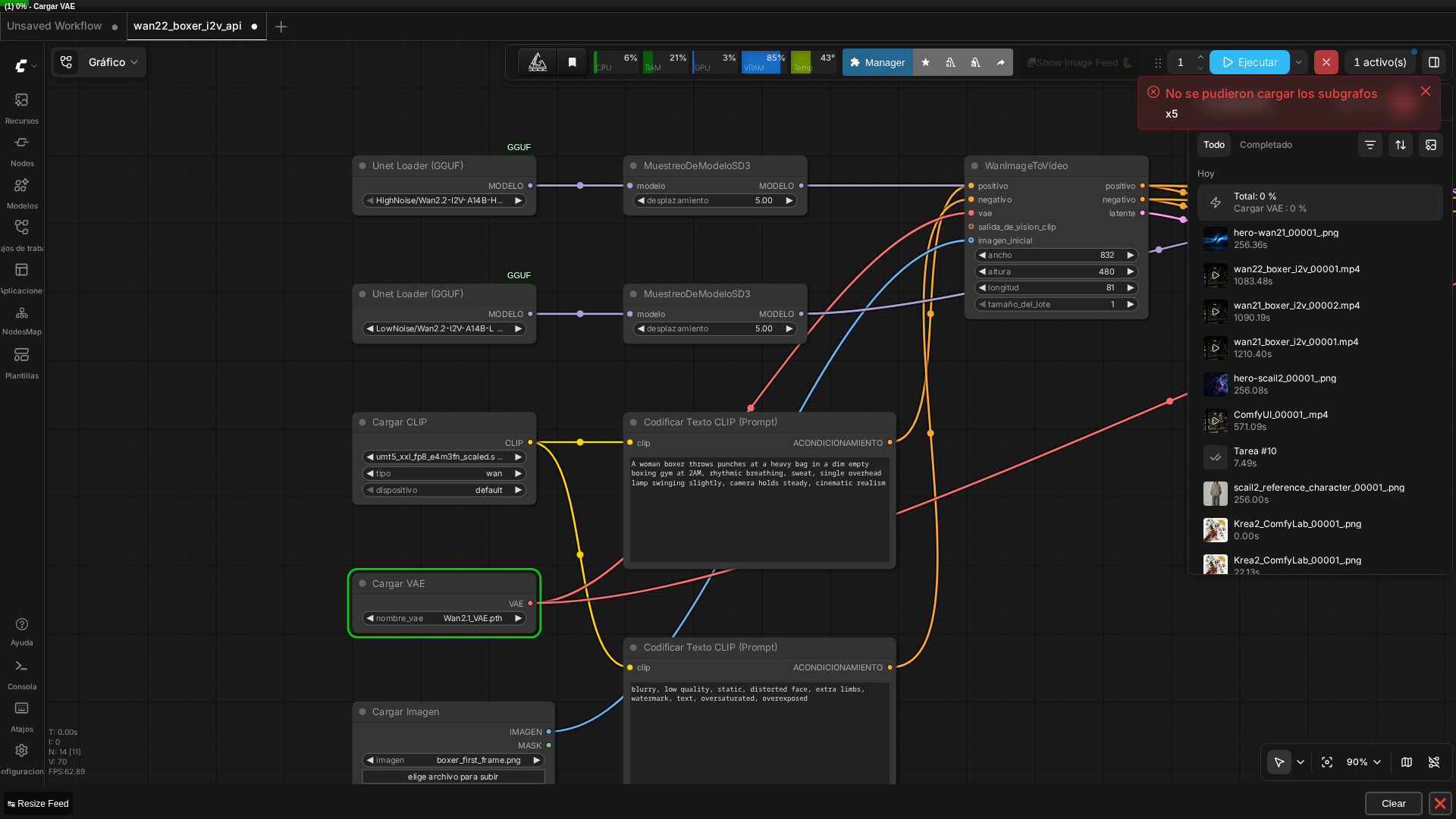 Real screenshot of the dual-model graph in ComfyUI v0.27.0, with both UnetLoaderGGUF nodes and the real prompt text visible.
Practical Takeaways for Local Video Generation
Wan 2.2 I2V is worth upgrading to if you’re running Wan 2.1 locally. The speed improvement alone (10% faster) is a bonus, but the quality jump is the real story. For image-to-video tasks where detail preservation matters—product animation, character motion, architectural visualization—the sharper output and more decisive motion are tangible wins.
VRAM management is feasible on 24GB cards with Q4_K_M quantization. The dual-model architecture doesn’t require both models in VRAM at once; dynamic staging keeps memory pressure reasonable. If you’re running an RTX 3090 or RTX 4090, Wan 2.2 I2V is accessible without major hardware upgrades.
Quantization trade-offs remain unresolved. This test used Q4_K_M to keep memory reasonable, but it’s unclear whether the quality improvement comes from Wan 2.2’s architecture or from some interaction with the quantization. If you want maximum fidelity and have the VRAM, testing Q6_K or even fp16 versions would be worthwhile—but that’s a future benchmark.
FAQ
Q: What’s different about Wan 2.2’s architecture compared to Wan 2.1?
A: Wan 2.2 uses a mixture-of-experts (MoE) design with two separate 14B models: a ‘HighNoise’ model for the early denoising steps and a ‘LowNoise’ model for later refinement steps, chained via two KSamplerAdvanced nodes. Wan 2.1 uses a single unified model.
Q: Is Wan 2.2 I2V better quality than Wan 2.1 I2V?
A: In this specific test (same frame, same seed), yes—clearly. The punching bag stayed sharp and well-defined across all frames in the Wan 2.2 output, versus visible softening in Wan 2.1’s. The test didn’t isolate whether this came from the new MoE architecture, the different quantization used, or general model improvements.
Q: Is Wan 2.2 I2V slower than Wan 2.1 since it uses two models?
A: No, it was actually faster in this test: 18 minutes 3 seconds versus Wan 2.1’s 20 minutes 10 seconds, despite running two 14B models instead of one. The models load dynamically one at a time rather than staying resident simultaneously.
Q: Why was Q4_K_M used instead of Q6_K like the Wan 2.1 test?
A: Q4_K_M keeps the dual-model footprint manageable (9.65GB per model, ~19.3GB combined on disk). Q6_K variants exist too (12GB per model per the QuantStack repo listing, ~24GB combined) but weren’t tested here. This quantization difference between the two tests means the quality improvement could partly be due to model differences rather than architecture. A proper comparison would use the same quantization for both.
Q: Can I use the optional lightx2v distillation LoRA to speed up Wan 2.2 I2V further?
A: Yes. The official template includes a 4-step lightx2v path that trades some quality for much faster generation. This test didn’t use it, so it’s unexplored in this benchmark. If speed is critical, testing the LoRA path would be a logical next step.
Q: How do I download the Wan 2.2 I2V GGUF models correctly?
A: Use the HuggingFace CLI, downloading the HighNoise and LowNoise files separately with --local-dir pointed at your models/diffusion_models/ folder. This test’s downloads landed in the correct HighNoise/ and LowNoise/ subfolders without needing manual path fixes — unlike some earlier tests in this series where nested-folder issues did occur, this one went cleanly.
Keep reading
If you want to see the Wan 2.1 test this one compares against, check our Wan 2.1 I2V article using the same starting frame. For the original text-to-video source, see our LTXV-2.3 + RTX Super Resolution walkthrough. And if GGUF quantization is unfamiliar, our GGUF models in ComfyUI guide covers the trade-offs.
🏆 Our recommendation
If you’re running Wan 2.1 I2V locally and have an RTX 3090 or better: Try Wan 2.2 I2V. In this test, the quality improvement was visible and measurable, execution was faster, and VRAM footprint was manageable with Q4_K_M quantization — though the quantization difference between the two tests means part of that gain might not be architecture-specific. Use the official template and download the GGUF models from QuantStack.
If you prioritize maximum fidelity over speed: Test Wan 2.2 at Q6_K quantization if your VRAM allows, or explore fp16 versions. The Q4_K_M used here is optimized for 24GB cards, but higher precision may unlock additional detail.
If you’re on limited VRAM (under 20GB): Stick with Wan 2.1 or test Wan 2.2 with even more aggressive quantization (Q3_K_M), understanding that quality may suffer. Dynamic staging helps, but dual models still require more headroom than single-model approaches.
Next steps in ComfyUI
Getting started
FAQ
- What's different about Wan 2.2's architecture compared to Wan 2.1?
- Wan 2.2 uses a mixture-of-experts (MoE) design with two separate 14B models: a 'HighNoise' model for the early denoising steps and a 'LowNoise' model for later refinement steps, chained via two KSamplerAdvanced nodes. Wan 2.1 uses a single unified model.
- Is Wan 2.2 I2V better quality than Wan 2.1 I2V?
- In this specific test (same frame, same seed), yes -- clearly. The punching bag stayed sharp and well-defined across all frames in the Wan 2.2 output, versus visible softening in Wan 2.1's. The test didn't isolate whether this came from the new MoE architecture, the different quantization used, or general model improvements.
- Is Wan 2.2 I2V slower than Wan 2.1 since it uses two models?
- No, it was actually faster in this test: 18 minutes 3 seconds versus Wan 2.1's 20 minutes 10 seconds, despite running two 14B models instead of one. The models load dynamically one at a time rather than staying resident simultaneously.